 Product Description
  Price Search
  Combine LLMs & Vision
  Fine-tune & Deploy
 Instance Segmentation on Click: Build Your Own AI Model
Train your own instance segmentation model with Ximilar’s no-code computer vision platform – from polygon annotation to a deployed API.

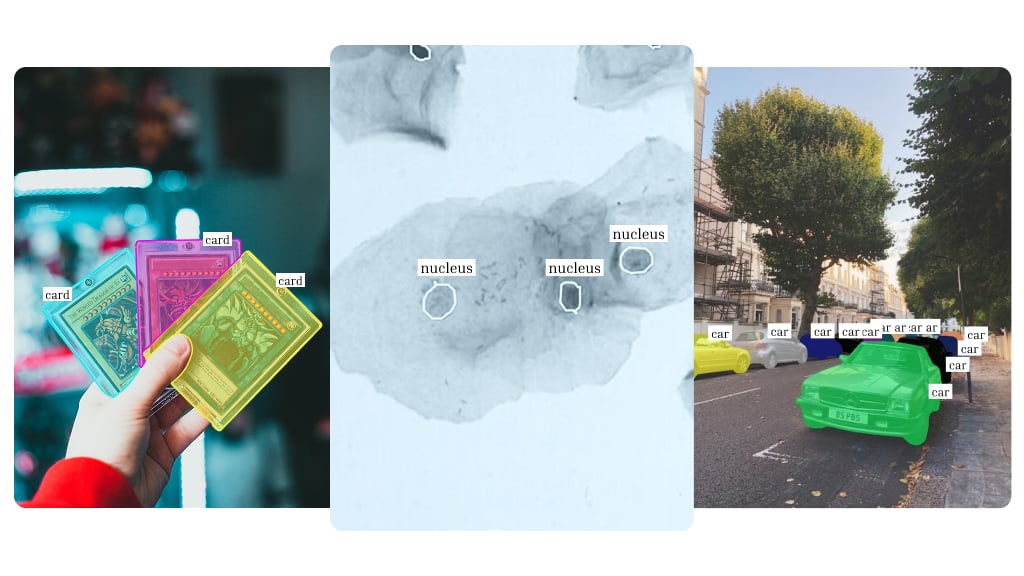
We’re thrilled to announce that custom instance segmentation is now available on the Ximilar platform, alongside image classification, regression, and object detection.
Instance segmentation combines object detection and semantic segmentation into one computer vision technique. Instead of drawing basic boxes around items, your model creates a precise mask for each one.
You can set up your own project, outline objects in your images, and train a powerful AI model to segment objects and create pixel-perfect masks that follow the exact shape of every item – all without writing a single line of code.
Image Segmentation Methods: Semantic, Panoptic & Instance
AI can approach image segmentation in a few different ways. Here’s how the main segmentation methods compare:
- Object detection finds individual objects and draws a rectangular bounding box around each one. This is often all you need, but a box always captures some extra background space, and boxes can overlap awkwardly when items sit close together.
- Semantic segmentation goes a step further: it can classify every pixel in an image with a class label – for example “person,” “car,” or “background.” It gives you precise shapes, but individual objects of the same class tend to melt together. For instance, if two cars park next to each other, the model just sees one big “car” blob. That is why it works best for uncountable things.
- Panoptic segmentation labels every pixel, background included, while still giving each object its own mask – built for full-scene use cases like autonomous driving, not the specific-object precision most of our customers need.
- Instance segmentation is a computer vision task that detects every object in an image and outlines its exact shape with a pixel-level mask. Ideal for countable objects, it gives each individual instance its own segmentation mask – accurate even when objects touch or overlap.
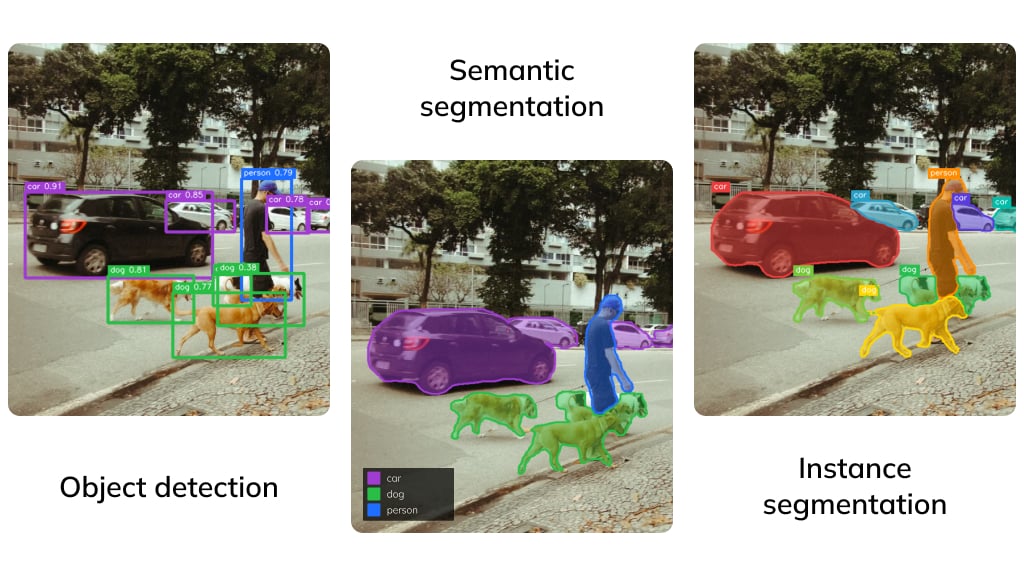
Whichever of these techniques your project needs, Ximilar now supports pixel-accurate instance segmentation out of the box – from simple counting to complex quality checks, across a wide range of image segmentation tasks.
How Instance Segmentation Works: From Mask R-CNN to Real-Time Transformers
Behind the scenes, our platform runs on cutting-edge, real-time transformer models – specifically RT-DETR (Real-Time DEtection TRansformer) and RF-DETR – which currently top the charts for speed and accuracy.
Earlier approaches such as Mask R-CNN, or single-shot models like YOLACT (You Only Look At CoefficienTs), laid the groundwork for the field, but today’s transformer-based models outperform them on both fronts. We handle all the heavy computing and processing of your visual data on our servers, so you don’t have to.
Applications of Instance Segmentation: When Do You Need Masks?
Here are typical applications of instance segmentation among our customers:
- Manufacturing & quality control – segment scratches, cracks or material defects and measure their exact area and shape, not just their rough position.
- Fashion & e-commerce – extract products from photos for clean background removal, product cutouts and virtual try-on.
- Collectibles – outline cards, coins or comics precisely for grading, centering analysis and automatic cropping.
- Medical & biotech imaging – segment cells, lesions or tissue regions in microscopy and medical images.
- Agriculture – separate individual plants, fruits or leaves to count them and estimate their size or health.
- Aerial & satellite imagery – segment buildings, roads, ships or fields for mapping and monitoring.
Whatever the field, the workflow to use instance segmentation is the same. Let’s delve into it.
Creating Your First Segmentation Model Step-by-Step
Log in to the Ximilar App and go to the AI Platform. If you’re new to the app, I recommend checking out the first steps guide for quick orientation.
All actions listed here can be done both via Ximilar App and REST API.
1. Define Your Task and Labels
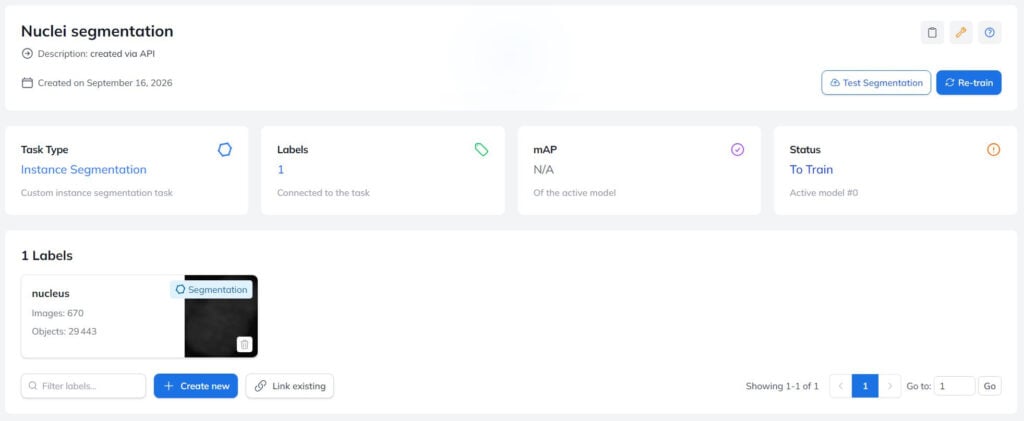
Go to Instance Segmentation and create a new instance segmentation task – it represents your future model and its API endpoint.
Then create the labels you want to segment (for example Nuclei, Scratch, or Card). One task can have many labels, and a single label can be reused by a number of tasks.
2. Upload Your Images and Build the Dataset
Upload your training images to the platform. Drag & drop in the app works fine, and you can also upload programmatically through the API.
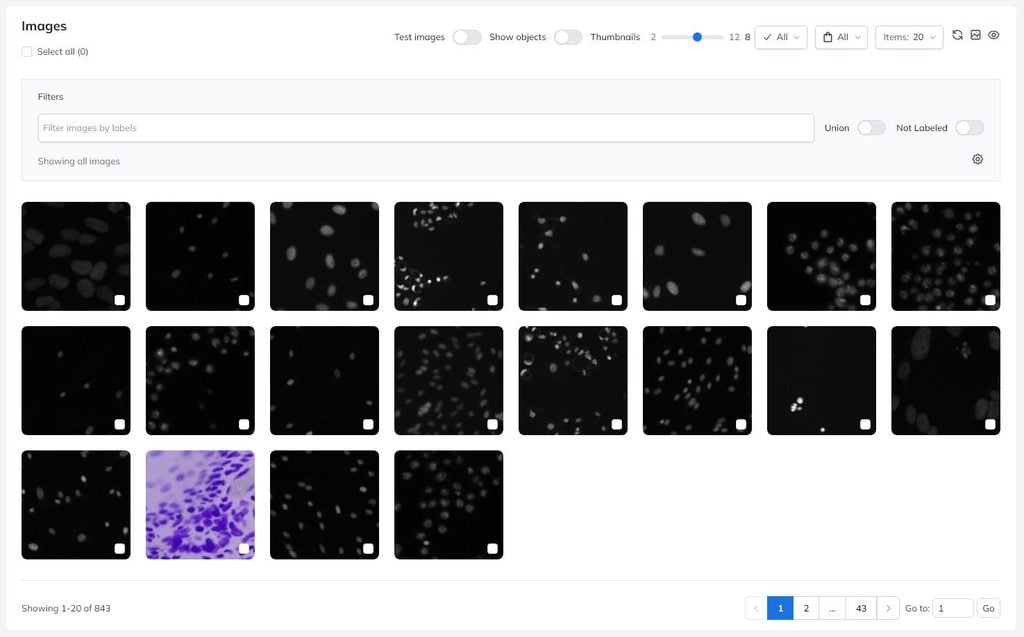
Make sure to use images that look like the ones your model will see in production: same camera angles, lighting, backgrounds, or resolution. As with every segmentation dataset: the better and more diverse your training images, the better your model.
For this test, I used a dataset of annotated cell images BBBC038v1, available from the Broad Bioimage Benchmark Collection [Caicedo et al., Nature Methods, 2019].
3. Annotate With Polygons
Now for the important part: open your training images one by one in Annotate, draw a polygon around each object of interest, and assign it a label. You can edit the points afterwards, so don’t worry about getting the outline perfect on the first click.
Every label needs at least 20 annotated images before training can start. We recommend beginning small, around 20–50 images per label, and improving the model iteratively.
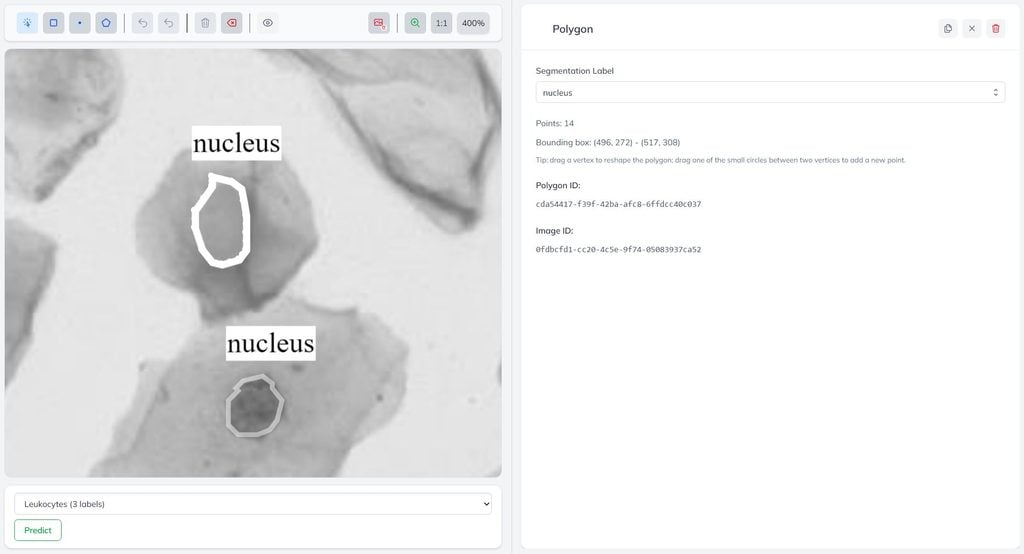
Annotating by hand gets faster once you have a trained model. The Predict button under the image runs an existing model to draw the polygons for you, leaving you to correct them instead of starting from scratch. It only offers tasks that already have a model – here it lists my other task, Leukocytes, because this one is still new and untrained.
4. Train Your Segmentation Model
Once your labels have enough annotated images, hit the Train button. That’s it – now you wait, and training time depends on your dataset size and the training queue.
Our platform converts your annotations into a training dataset, applies image augmentation, trains the model on GPUs, and evaluates its performance on a held-out part of your data.
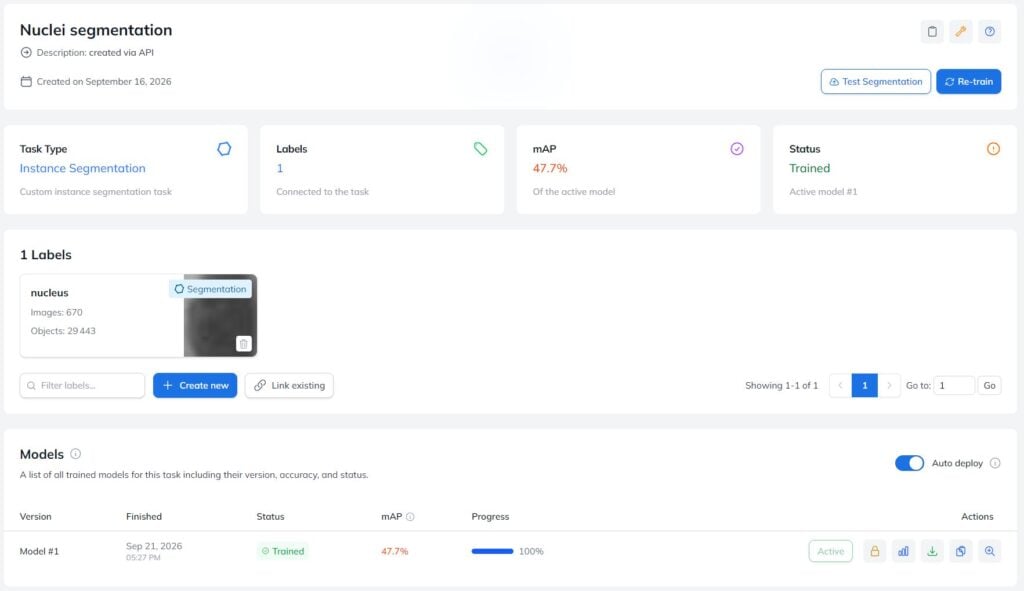
When training finishes, you’ll see the model in the task detail together with its accuracy – the mAP (mean average precision) of the predicted instance masks – plus detailed per-label metrics. Ximilar automatically deploys the best instance segmentation model version to the API.
5. Test the Model via API Form
Once your model is trained, you can test it via a dedicated form in the App, and also via API. In the App, open Instance Segmentation, go to Test Segmentation, and upload a new image by drag & drop or URL.
As you can see, this particular test image was segmented very well. The result shows all labelled objects, as well as their confidence levels.
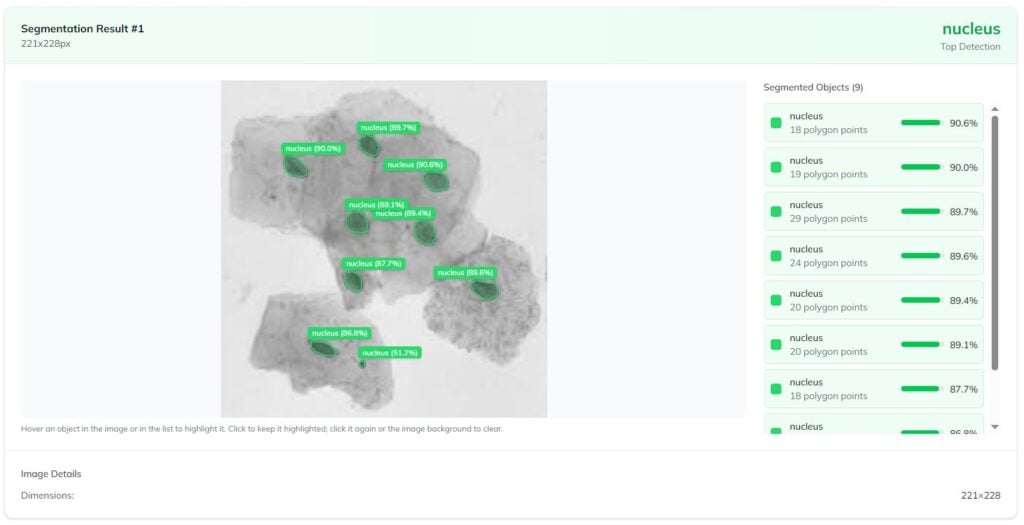
The form simulates the exact API request you’ll need to make when running your segmentation model on new images. It returns the analysed image along with the full request and response. You can copy the generated curl command straight into your codebase.
6. Iterate: Upload More Data and Retrain
The first model is rarely the last one. Test it on real images and find the cases where it struggles. Then annotate more images like those and train again to improve segmentation accuracy. Every training run creates a new model version, so you can compare model performance and instance segmentation results across versions, and always keep the best one in production.
The first version of my segmentation model reached 47.7% mAP on the predicted masks and 77.0% at the looser IoU 0.50 threshold – the model finds the nuclei reliably, but tracing each exact boundary is harder than locating it.
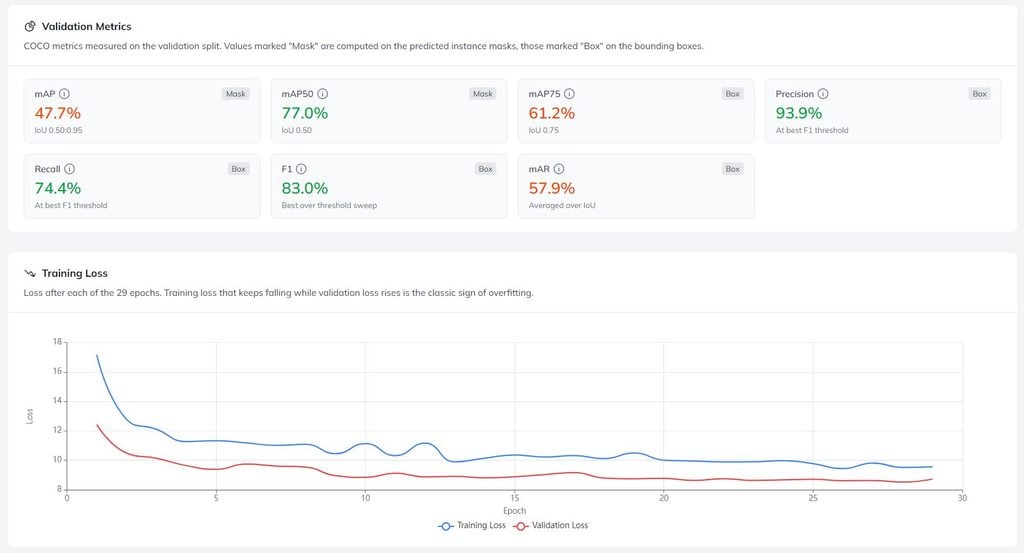
Precision of 93.9% against recall of 74.4% on the bounding boxes says the same thing from another angle: almost everything it marks as a nucleus really is one, while it still misses some, mostly where nuclei touch. The loss curves show no overfitting, and both flatten out around epoch 15, so the next gain would come from more annotated images rather than longer training.
Use Your Model via API
Every trained task is instantly available as a REST API endpoint. Send an image via _url or _base64, and get back every detected instance with its probability, bound_box and polygon.
Don’t forget to replace __API_TOKEN__ with your unique authentication token, which can be found on all dashboards in your workspace in the App. ID of each task can be found in the task detail.
curl -X POST https://api.ximilar.com/segmentation/v2/segment \
  -H "Authorization: Token __API_TOKEN__" \
  -H "Content-Type: application/json" \
  -d '{"task": "__TASK_ID__", "records": [{"_url": "https://example.com/image.jpg"}]}'
The polygon field lists the segmentation mask’s outline coordinates in pixels, ready to be drawn, cropped, measured, or used for background removal.
{
  "records": [{
    "_url": "https://example.com/image.jpg",
    "_objects": [
      {
        "name": "nucleus",
        "prob": 0.98,
        "bound_box": [120, 45, 380, 610],
        "polygon": [120, 45, 380, 47, 379, 610, 121, 608]
      }
    ]
  }]
}
Every detected instance also includes a bound_box – the bounding box in [xmin, ymin, xmax, ymax] coordinates. You can tune the confidence threshold with the keep_prob parameter. See the full reference in our API documentation.
Tell Us About Your Ideas
A few reasons to build your segmentation model with Ximilar:
- Codeless training option – annotate, train and deploy from the browser; the API is there when you want to automate.
- State-of-the-art models – transformer-based architectures trained on GPUs with automatic augmentation, at no extra infrastructure cost.
- Instant deployment – every trained model is a production API endpoint, with versioning and automatic deployment of the best version.
- One platform – classification, object detection, segmentation, similarity search and Flows share one workspace, so you can combine several models into a single API endpoint.
Unlike prompt-based tools such as Meta’s Segment Anything Model, Ximilar trains a dedicated model on your own labels – so it recognises exactly the objects your project cares about, not a generic notion of “object.”
Sign up for free and train your first segmentation model, or contact us if you’d rather talk through a custom project first.

Zuzana Raidová
Head of Marketing
Zuzana is a marketing specialist, biologist, and illustrator addicted to reading and hiking. At Ximilar, she takes care of web content and communication, tries to keep the articles engaging, and the office temperature low. She likes science, kung fu movies, and rain.
Tags & Themes
Related Articles
How to Train an Object Detection Model With One Click
Define, optimize and deploy to API your custom object detection model without coding.

Hololive Card Recognition for Card Scanners & Collector Apps
Ximilar’s AI now identifies every hololive OFFICIAL CARD GAME (hOCG) card – name, set, rarity, and more – in English and Japanese.
Naruto Mythos Card Recognition by TCG AI
Ximilar’s card recognition AI now identifies English Naruto Mythos TCG cards – name, set, rarity, and other details returned directly from the API.