 Product Description
  Price Search
  Combine LLMs & Vision
  Fine-tune & Deploy
 Cardstream: Open-Source Card Scanner for Live Streams
An open-source card scanner for live streams. Cardstream identifies TCGs like Pokémon and sports cards in real time from your video.

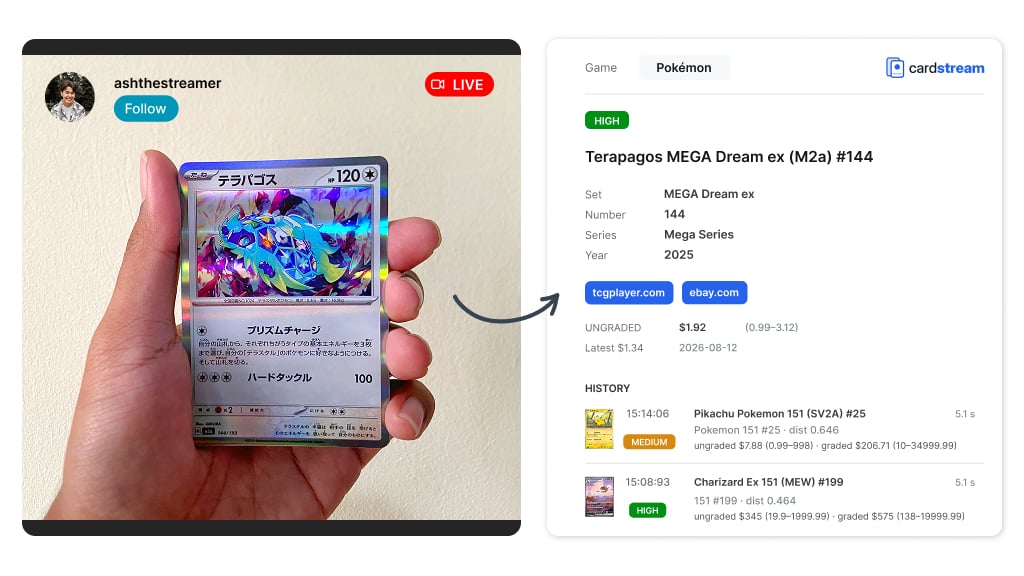
Live shopping is booming, and a fast, accurate card scanner for live streams is quickly becoming essential. Analysts expect United States live shopping to reach almost $20 billion in sales in 2026, up 35% from the year before. Whatnot, the largest live shopping platform in the world, reached a $20 billion valuation in August 2026. Collectibles and trading cards are its biggest business.
A typical card show is simple. The seller opens packs on camera, holds up each card, and names it for viewers. Sometimes they estimate the price too. Many do this from memory, or they stop to look the card up. It is slow, and mistakes happen. Collectors watching the stream want to know all details and pricing data fast.
That is why we built Cardstream, an open-source tool for real-time card recognition on live streams, powered by computer vision. The tool is in beta, and we improve it continuously. This post shows what it does and how to start.
What Is Cardstream?
Cardstream is a small app that runs on your own computer. Point a camera at a card and Cardstream returns its name, set, and confidence the moment it enters the frame.
A result takes about half a second. There is no scan button and no upload. Instead, the app is built to scan cards continuously, straight from your video.
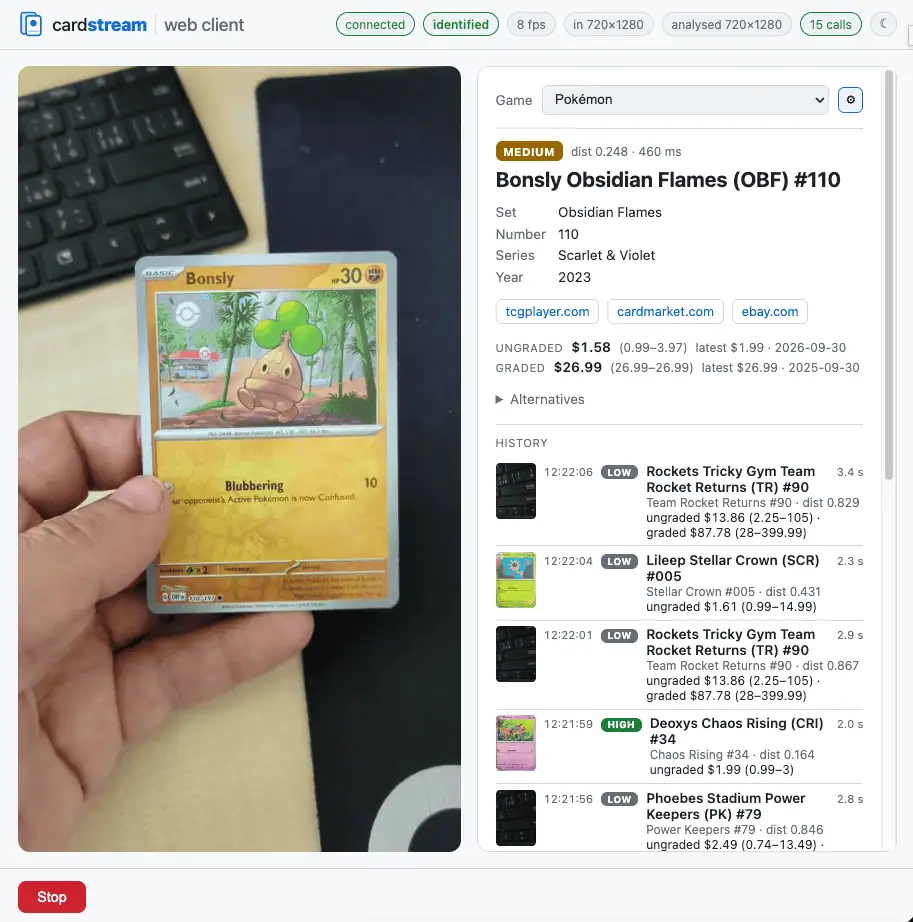
Our Collectibles Recognition API handles the identification. Cardstream calls the TCG ID and Sport Card ID endpoints – our identifiers for card games (TCGs) and sports cards. Everything else runs locally on your computer’s CPU: finding the card in the video, then deciding when to call the API. You do not need a GPU.
What It Scans: TCGs and Sports Cards
Cardstream supports the same categories as our API. You switch the category in the settings to scan a different game, even during a stream:
- Trading card games (TCGs): over 15 games, including Pokémon, Magic: The Gathering (MTG), Yu-Gi-Oh!, One Piece, and Lorcana
- Sports cards (coming soon): baseball, basketball, football, hockey, soccer, and mixed martial arts (MMA)
What You Get for Every Card
We believe our identification system is the best in the world, and we expand it continuously. For every card, you get:
- Name and full name
- Set, set code, and card number
- Series, year
- A confidence level for features (high, medium, or low)
- Links to marketplaces like TCGplayer, eBay, and Scryfall
- Alternative matches (up to four)
- Pricing statistics, split into graded and ungraded sales
Beyond English and other Latin-script languages, Cardstream recognizes cards in Korean, Thai, Japanese, and Chinese. It also flags visual details like foil and holo finishes, and whether a card is signed. See the Features page for the full list.
Graded Slabs: PSA, BGS, CGC, and More
Breakers show plenty of graded cards, and the recognition service behind Cardstream can read those too.
Using OCR, it pulls the grading company, the grade, and the certificate number from the slab label – for PSA, Beckett, CGC, SGC, and more – and returns it as structured data you can store or display.
Open Source and Self-Hosted
Because the base of Cardstream is open source, you can even write your own connector to another identification system and save a lot of money. The code lives on GitHub under the Apache-2.0 license, and the same license covers the detection models the installer fetches alongside it.
Self-hosted means the whole pipeline runs on hardware you control: your API key, your video, and your card data stay on your own machine. Install it whichever way fits your setup:
- A one-line install script that sets up a virtual environment and downloads the model weights
- The release wheel from PyPI:
pip install 'cardstream[client,onnx]' - A clone-and-build from source, with Docker and Windows builds
One API Call per Card, Not per Frame
Cardstream itself is free. You pay only for the identification calls, and only if you choose Ximilar Collectibles Recognition to make them.
At 15 frames per second, a live stream produces 54,000 frames an hour – far too many, and far too costly, to send each one to an API. Cardstream runs a small state machine on your computer, and only its last step ever calls out:
- Detect – a local model finds the card and cuts a clean crop. No API call.
- Wait – a motion gate holds until the card stops moving. No API call.
- Compare – a quick check decides whether this is the same card as the last one. No API call.
- Identify – only a genuinely new card goes to Ximilar. One call.
Each new card is one call – that is it. In a typical show that is around 100 calls per hour instead of 54,000. At 10 credits per identification, a whole evening of breaks costs a few thousand credits.
How to Use the Card Scanner for Whatnot, eBay Live, Twitch, and YouTube
Cardstream reads your video feed and nothing else – no marketplace login, no API key, and no bot in your chat. It is not affiliated with any marketplace or streaming platform, but it works with all of them just the same – Whatnot, Fanatics Live, eBay Live, TikTok Shop, Twitch, or YouTube Live. Point it at your stream, and it identifies each card as it appears.
The moment you point a camera at a card, Cardstream provides its detailed identification and price statistics. Slab labels are read separately.
There are three easy ways to connect it:
- OBS Virtual Camera. If you broadcast from OBS, start the virtual camera. Cardstream then reads your scene like a normal webcam.
- A second output from OBS. OBS pushes a copy of your stream to Cardstream over RTMP or SRT. Your viewers see exactly what they saw before.
- A camera on the table. If you go live from a phone, place a webcam or IP camera over the spot where you reveal cards.
Once it is running, here is what you get:
- Real-time identification – the card name, set, and confidence appear as each card shows, ready to read out to your viewers.
- Running history – every card is listed with the time it stayed on screen, so your break notes write themselves.
- Step-by-step guide – the live selling guide covers every route.
- One-time setup – about fifteen minutes, and you are done.
Start Scanning in About Fifteen Minutes
Getting started is quick. You need three things: Cardstream app, a camera or an OBS scene, and a Ximilar account for the identification calls.
- Install Cardstream and sign in with your API token (a unique identifier you get after logging in to the Ximilar App).
- Connect your video: an OBS virtual camera, a second OBS output, or a webcam on the table.
- Pick your game or card category in the settings.
- Go live. The side panel names each card as you show it, and the history panel keeps a log you can reuse for listing later.
For a single set, prefill it so the endpoint stops guessing:
cardstream-web --game Pokemon --set-code CRI --alphabet latin --price-statsCardstream Cloud – Reporting and Analytics for Your Streams
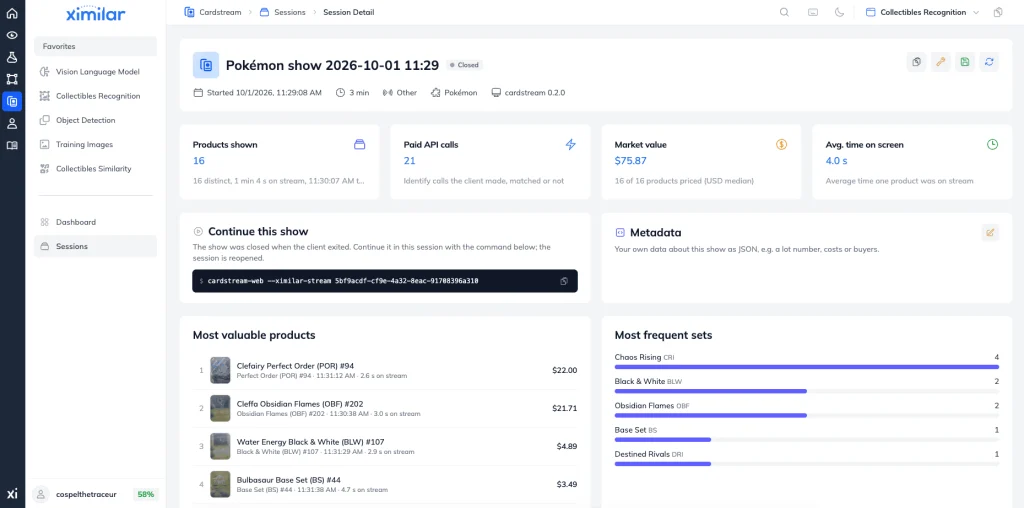
Cardstream can also report on a whole session, not just identify cards one by one. Enable it with one flag:
cardstream-web --game Pokemon --alphabet latin --price-stats --ximilar-stream NEWThis creates a new session on the Ximilar Platform, where every scan from your stream is automatically logged.
The session dashboard will display your most valuable products, most frequently scanned sets, the total value of your cards, and the number of paid API calls used.
Beta Today, Better With Every Release
At the time of writing this article, Cardstream is in beta. We keep testing, tuning the defaults, retraining the models, and adding guides and features.
Your feedback shapes what we build next. If you sell cards live, try it and tell us what is missing. Open an issue on GitHub, or contact us via live chat in the bottom right corner or via contact form. Install it, point a camera at your cards, and go live.
Frequently Asked Questions
Does Cardstream work as a Whatnot card scanner?
Yes. Point it at your Whatnot live stream, and it identifies each card in real time during the Whatnot auction, the way a scanner would. It reads only your video feed, so it never logs in to Whatnot, and it is not affiliated with the platform.
Does Cardstream show card pricing or grade cards?
Cardstream surfaces pricing statistics and marketplace links for each card it recognizes, and it can read the grade off a slab label. It is not a price-sniping tool, though, and it does not grade raw cards itself. The app tells you what a card is, not what to bid for it.
Is Cardstream a free app?
The app is open source and free under the Apache-2.0 license. You pay only for the identification calls, and only if you use Ximilar Collectibles Recognition to make them.

Tags & Themes
Related Articles

Recognize Every Palworld TCG Card in English and Japanese
Ximilar’s card AI now handles Palworld card recognition in English and Japanese, from a single scan. Test it in the App, via API or the demo.
Instance Segmentation on Click: Build Your Own AI Model
Train your own instance segmentation model with Ximilar’s no-code computer vision platform – from polygon annotation to a deployed API.
How to Train an Object Detection Model With One Click
Define, optimize and deploy to API your custom object detection model without coding.