 Product Description
  Price Search
  Combine LLMs & Vision
  Fine-tune & Deploy
 The Ultimate Guide to LLM Fine-Tuning Platforms and Tools
The best LLM fine-tuning platforms and tools, from training and deployment to inspecting custom language models.

Fine-tuning is the process of taking a pre-trained Large Language Model (LLM) and adapting it to a specific use case using your own labeled data – going far beyond what prompt engineering alone can achieve.
Doing this with your own model is the best way to get predictable outputs, guarantee data privacy, and eliminate unpredictable API bills. But if you’ve ever tried to wrangle PyTorch environments or figure out why your cloud GPU instance keeps crashing, you know that the infrastructure side is half the battle.
Fortunately, a massive ecosystem of specialized LLM fine-tuning tools has emerged to make training and deploying custom AI accessible to everyone. From no-code visual builders for on-device inference to bare-metal GPU access for running Unsloth, here are the best platforms to fine-tune, manage, and inspect your custom models.
Online Platforms & LLM Fine-Tuning Tools
Let’s start with fully managed fine-tuning platforms. The biggest advantage here is that you don’t need to rent or maintain a massive infrastructure of GPU servers to train your model. These cloud systems provide the compute, the pipeline, and the deployment endpoints all in one place.
Big Cloud Providers – Google Cloud, OpenAI, and AWS
Honestly, the first service for LLM fine-tuning that I used was the OpenAI platform. Unfortunately, they started winding it down. In mid-2026, OpenAI began restricting fine-tuning, pushing users toward their managed services or newer methods like RAG and custom GPTs.
While you can still access some fine-tuning capabilities through the Microsoft Azure Foundry service, it’s clear OpenAI wants to control the infrastructure tax and focus on base model improvements. What are the alternatives?
Google Cloud
Google AI Studio used to be a great, simple entry point for newcomers. But Google has shifted its focus and killed the fine-tuning service.
Today, the best option for fine-tuning their Gemini models is through the enterprise-grade Gemini Enterprise Agent Platform (formerly Vertex AI). Renaming and changing services every year makes it genuinely confusing to find what you’re looking for – even for experienced practitioners.
Anthropic & AWS Bedrock
Anthropic doesn’t offer a direct API to fine-tune their Claude models natively. However, you can fine-tune their smaller, faster models (like the Claude Haiku series) exclusively through Amazon Bedrock.
Amazon Bedrock is right now probably the simplest service that the big cloud providers offer – a tutorial here. My personal feeling is that the big cloud providers right now want to focus primarily on inference and building their own custom LLMs, which they want to sell you – rather than providing efficient fine-tuning tools for your data.
Other Alternatives
If you are looking for world-class open-weight models, some of the best fine-tuning ecosystems right now are coming from non-US providers. Western tech giants are increasingly locking their best models behind closed APIs. Chinese enterprise companies, on the other hand, are aggressively betting their AI strategy on open-source dominance.
The models they are releasing are not just competitive. In many benchmarks for coding, math, and reasoning, they are actually leading the pack. A provider worth mentioning here is the Alibaba Cloud Model Studio (the company behind the Qwen family models). The same goes for the ByteDance Volcano Ark platform.
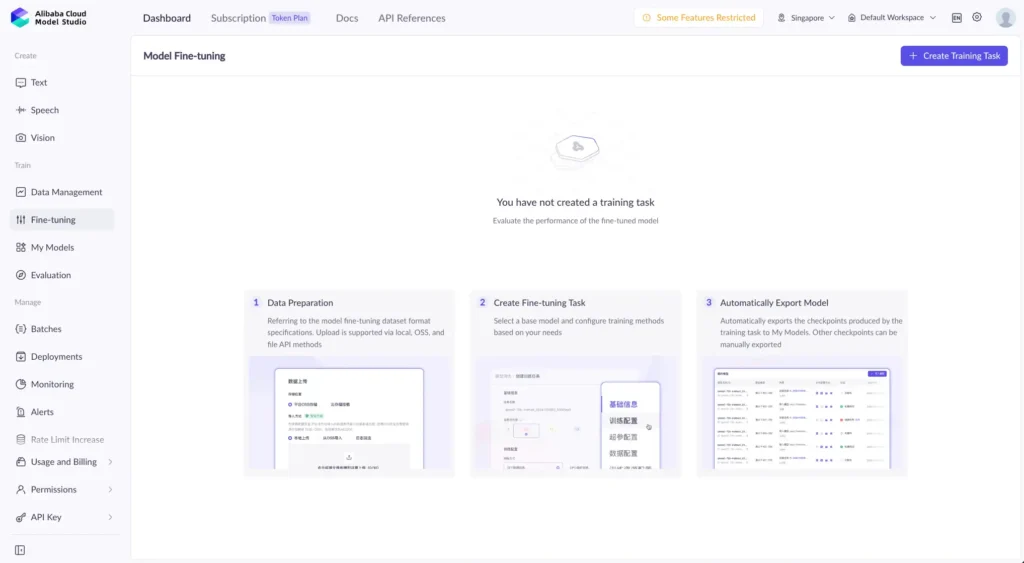
- Pros: Immediate access to top-tier hardware and proprietary models, built-in deployment endpoints, and a mature platform.
- Cons: Strict usage limits. You also never “own” the model weights (cloud inference only). Integration is strictly via API, and you are at the mercy of the provider abruptly deprecating or killing the service. Last, you can not be sure whether your data is used to improve their services.
Ximilar Vision Language Platform
While most fine-tuning platforms are heavily biased toward text, Ximilar stands out by focusing entirely on the intersection of computer vision and text: Vision-Language Models (VLMs). If you are building AI that needs to “see” as well as it reads and generates – like extracting structured data from invoices, analysing defects on products, or automatically tagging real estate images – this is the platform to use.
Ximilar provides a completely no-code environment for fine-tuning multimodal open-source models (such as Qwen-VL, Gemma, or Liquid Foundation Models). You simply define your desired output schema (like JSON, YAML, or CSV) and upload your image-text pairs. The platform then handles the instruction fine-tuning via LoRA (Low-Rank Adaptation) or full parameter updates. One of its most disruptive features is the dataset management, building, and model evaluation tooling.
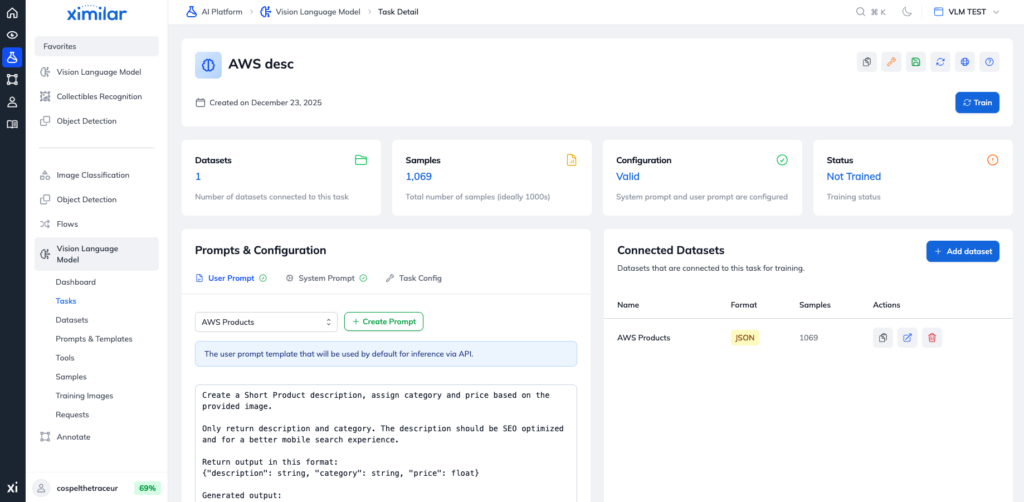
The pricing model is unusual. Ximilar does not charge for the actual model training time, allowing you to iterate on your fine-tuning datasets aggressively without watching the compute meter. Once your pre-trained model is fine-tuned, you fully own the weights and can host it via the serverless REST API. You can also download it for completely offline, air-gapped deployment.
- Pros: Best-in-class tooling for multimodal/vision tasks. No compute fees for training time, natively outputs structured JSON data from images. Also, it allows for full offline model export. Very mature dataset management with no-code and API capabilities.
- Cons: Only smaller models are available right now.
Together AI
Together AI provides an incredibly intuitive system for fine-tuning top-tier open-source models like Qwen, Gemma, and DeepSeek. You aren’t limited to their default list either. You can easily pull a base model directly from the Hugging Face Hub or even resume training from a previous run.
The fine-tuning process is remarkably straightforward. Select your base model, upload your training and validation datasets, and click to create a fine-tuning job. The platform requires your dataset to be formatted as JSON Lines (JSONL) using the standard conversational structure. Here is a quick example:
{
  "messages": [
    {
      "role": "system", "content": [{"type": "text", "text": "You're helpful AI assistant."}]
    },
    {
      "role": "user", "content": [{"type": "text","text": "QUESTION"}]
    },
    {
      "role": "assistant", "content": [{"type": "text","text": "ANSWER"}]
    }
  ]
}
The biggest advantage of Together AI comes after the training is complete. Unlike the big cloud providers, you are not locked into their ecosystem. You can download your fine-tuned model weights and run them entirely offline on your own hardware.
- Pros: Access to the latest open-source models. Zero infrastructure setup, and full ownership of your model weights (downloadable for offline use).
- Cons: You must upload your training data to a third-party server (which can be a blocker for highly sensitive enterprise data). You get less granular control over advanced training hyperparameters compared to raw code. Also, there is no dataset builder to help you prepare your data.
Replicate AI
Replicate AI is more of a platform for deploying your own models or using open-source ones. You can simply upload the model to Replicate and run it.
While they fully support text models like Meta’s Llama 3 and Mistral, Replicate truly shines when you need to fine-tune image and video generation models like FLUX, Stable Diffusion, or even specialised audio models. For them, they have a specific tool: fast-flux-trainer.
Like Together AI, Replicate doesn’t lock you in. You can download your fine-tuned weights (usually as a LoRA adapter) to run on your own hardware.
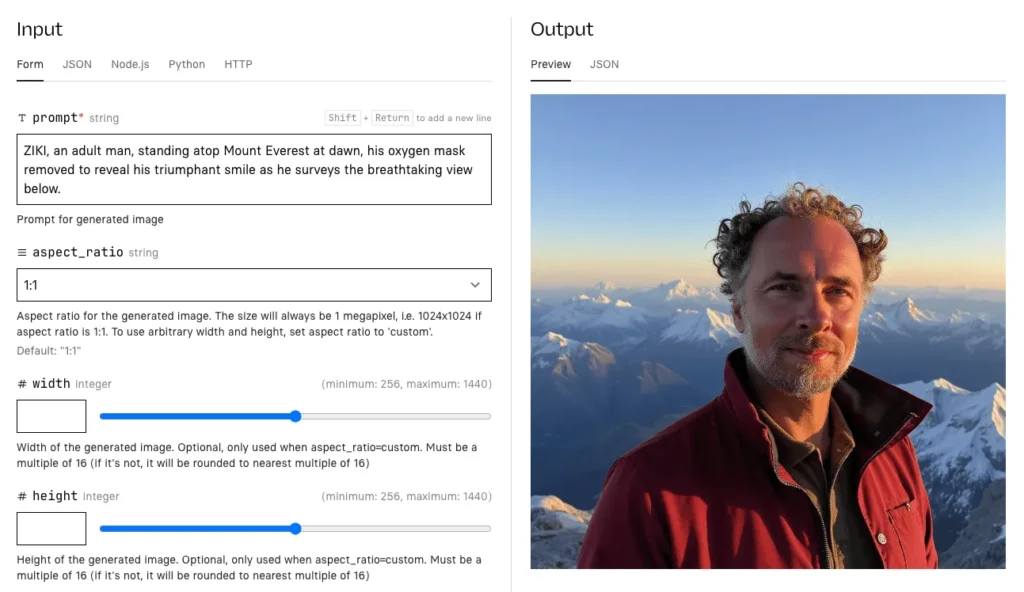
- Pros: Great support for multimodal models (vision, audio, image generation). Massive library of community-created models to build upon, and zero-headache API deployments.
- Cons: No dataset management and primary focus on inference rather than fine-tuning.
Ertas AI
A new project that is very similar to Together.ai and Ximilar. However, the workflow is entirely visual and requires no machine learning expertise.
You upload your dataset (or pull one directly from Hugging Face) and fine-tune an open-source model like Llama 3.2 or Gemma 4 on their fast cloud GPUs. Then you export the resulting model as a heavily optimised GGUF (a quantised model format for local inference) file. From there, you can embed the fine-tuned model directly into your iOS, Android, or desktop application using tools such as llama.cpp.
- Pros: Zero per-token inference costs once deployed. Complete data privacy since the model runs locally on the user’s device, and works completely offline without network latency.
- Cons: Right now, only text LLMs – no multimodality. You are limited to smaller models that can actually fit into the RAM of consumer devices. Dataset management is not very polished.
Methods for Fine-Tuning: Code & Libraries
Of course, if you have the time, want to focus on coding, and deeply understand how models actually learn, you can build the training pipeline yourself.
For your initial experiments, I highly recommend using Google Colab. It allows you to rent cloud GPUs and fine-tune smaller open-source models incredibly cheaply – or even for free. Let’s start with the major libraries you will probably use.
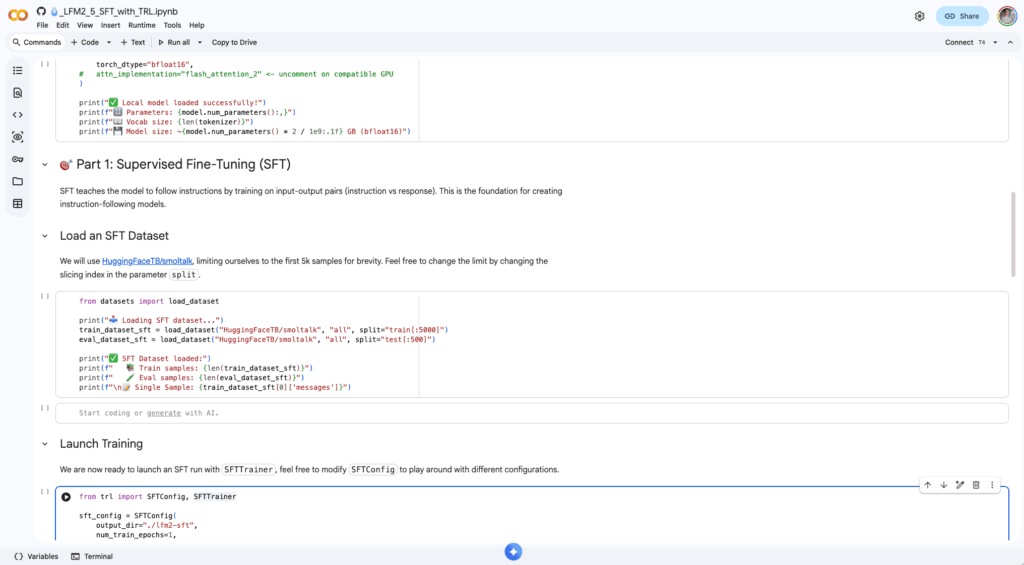
Hugging Face => Transformers + TRL + PEFT
As the foundation of the open-source AI ecosystem, Hugging Face isn’t just a model repository. It is the underlying engine for almost all custom model training. When developers talk about fine-tuning of large language models from scratch, they are usually referring to Hugging Face’s TRL (Transformer Reinforcement Learning) and Transformers libraries.
TRL has become the industry standard for advanced alignment techniques. For instance, Supervised Fine-Tuning (SFT), Direct Preference Optimization (DPO), and the newer Group Relative Policy Optimization (GRPO) that powers reasoning models like DeepSeek. While it requires you to write actual Python code (often using PyTorch), it gives you absolute, granular control over every aspect of the training loop.
Hugging Face is right now probably the most-used library when it comes to fine-tuning LLMs. We also use this library for the Ximilar platform for fine-tuning.
The usage is very straightforward: select the model from Hugging Face, create a configuration and trainer. You can also optionally set up parameter-efficient fine-tuning with LoRA (a lightweight, memory-efficient technique for adapting large pre-trained models):
from trl import SFTConfig, SFTTrainer
from peft import LoraConfig, get_peft_model
from transformers import AutoTokenizer, AutoModelForCausalLM

model_id = "YOUR_MODEL"
tokenizer = AutoTokenizer.from_pretrained(model_id)
model = AutoModelForCausalLM.from_pretrained(model_id)

# create lora configuration
lora_config = LoraConfig(lora_alpha=16, ...)
lora_model = get_peft_model(model, lora_config)

# create your config for supervised fine tuning trainer
sft_config = SFTConfig(...)
stf_trainer = SFTTrainer(model=lora_model, train_dataset=dt_tr, processing_class=tokenizer)
sft_trainer.train()
Unsloth AI
If you are training on a single GPU (like in a free Google Colab notebook or a single cloud instance), Unsloth is practically mandatory. It is an optimization library that aggressively modifies the underlying math and GPU kernels. This makes the fine-tuning process insanely efficient.
Unsloth can train models up to 2–5x faster than standard implementations while using 70% less VRAM. This means you can comfortably fine-tune an 8B parameter model (like Llama 3) on a cheap consumer GPU without your system crashing from memory overloads.
They provide excellent, beginner-friendly Colab notebooks where you can upload your data, click “Run All,” and export the model to GGUF in an hour. This is the absolute fastest and most memory-efficient way to train on a single GPU. Both the Jupyter/Colab notebooks and native fast exports to local formats like GGUF are incredibly beginner-friendly.
In May 2026, Unsloth.ai released Unsloth Studio – an open-source, no-code web UI for training, running, and exporting open models in one unified local interface. It contains several useful features including a system to generate an instruction dataset from PDFs or CSV files, export to GGUF, and more. All training configs can be saved and loaded as a YAML file. This is probably the best way right now if you want to use open-source tools.
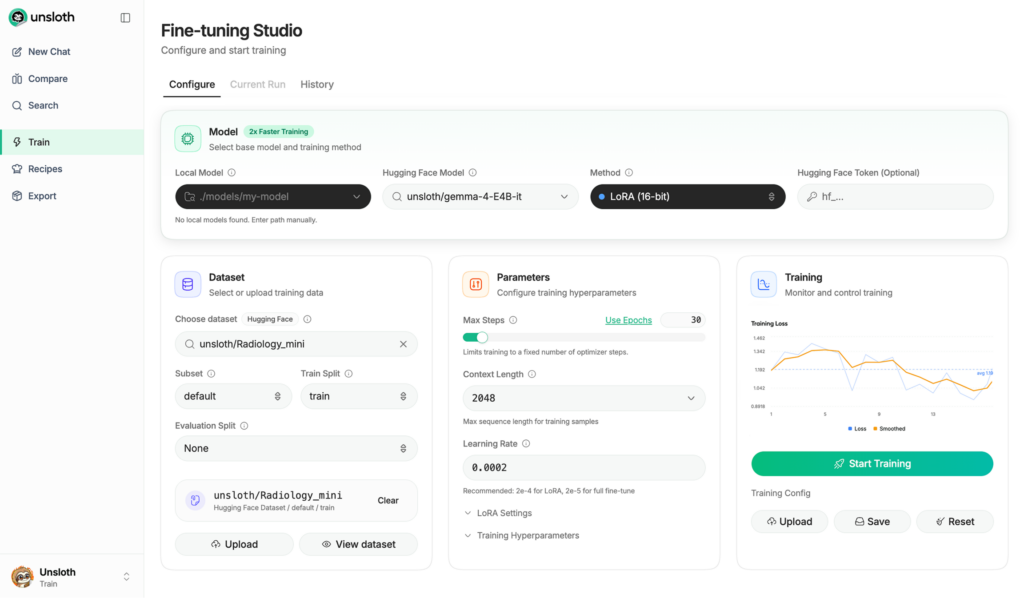
Axolotl
While Unsloth is the king of single-GPU setups, Axolotl is the framework you graduate to when you are building a reliable production pipeline. Instead of writing complex Python training scripts, Axolotl allows you to control the entire fine-tuning process using a single, readable YAML configuration file.
You simply define your dataset paths, your base model, and your hyperparameters in a text file. Axolotl then handles the heavy lifting of distributed multi-node training across 4, 8, or more GPUs. It is battle-tested by serious enterprise teams who want their training runs to be reproducible and easily version-controlled in Git.
Axolotl offers many recipes and notebooks on how to fine-tune an LLM. To use it effectively, you should be comfortable with YAML configurations and have a working knowledge of LLM training.
LLaMA Factory
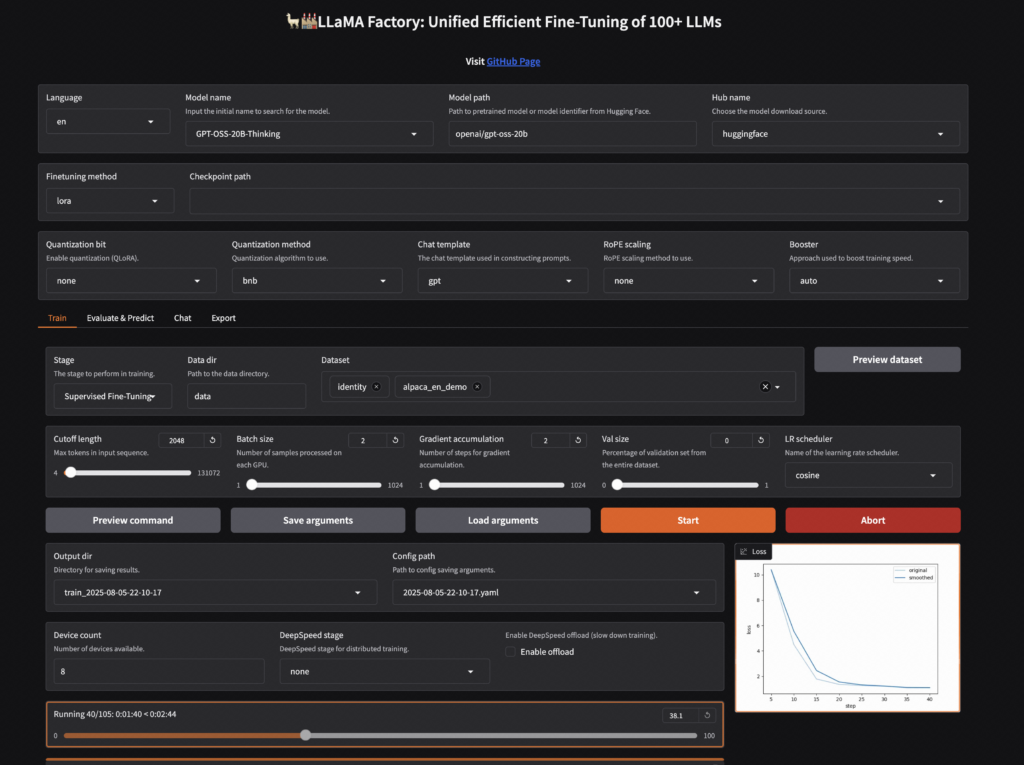
Not everyone wants to write Python scripts or debug YAML files. LLaMA Factory bridges the gap by providing a complete Web UI (often called LlamaBoard) that runs directly in your browser.
Through a simple graphical interface, you can select from over 100 supported LLMs and VLMs, attach your dataset, select your fine-tuning method (like LoRA or QLoRA), and launch the training job with a click.
It actually uses Unsloth and Hugging Face libraries under the hood, wrapping them in a clean visual dashboard so you don’t have to touch the command line. It comes from Chinese developers, so there is naturally strong support for Chinese open-source models like Qwen.
Megatron-LM by NVIDIA
If you are moving past fine-tuning on a single machine and need to train massive foundation models across hundreds or thousands of GPUs, Megatron-LM is the undisputed industry standard. Built and maintained by NVIDIA, it is the underlying architecture used by major AI labs to train some of the world’s largest models (from 2B to almost 500B parameters).
While tools like Axolotl are great for orchestrating standard fine-tuning, Megatron-LM (and its underlying engine, Megatron Core) provides the raw, highly optimised building blocks for extreme-scale distributed training. This library is realistically only for organisations with the resources to purchase large numbers of GPUs.
GPU Cloud Providers
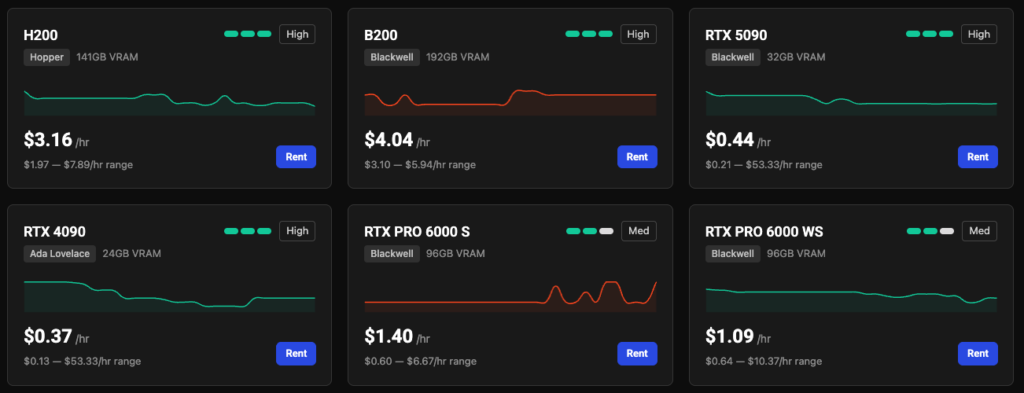
If you don’t have a rack of NVIDIA GPUs sitting in your basement or a bunch of Nvidia DGX Sparks, you are going to need to rent compute.
While the big hyperscalers (AWS, GCP) are great for massive enterprise deployments, they are often overpriced and overly complex for independent developers or small teams trying to fine-tune a model. Instead, the AI community relies heavily on specialised, low-cost GPU clouds.
RunPod
RunPod has essentially become the default cloud provider for the open-source AI community. They offer two tiers: “Community Cloud” (cheaper, peer-to-peer rented GPUs) and “Secure Cloud” (enterprise-grade GPUs hosted in high-tier data centres).
Their platform is incredibly user-friendly for fine-tuning models. You can spin up a pod with a massive GPU like an RTX 6000 Ada or an A100, and it will instantly boot into a Jupyter environment with PyTorch and CUDA pre-installed.
Beyond just renting raw servers, they offer a Serverless API product. Once your model is fine-tuned, you can deploy it right back onto RunPod and only pay for the exact seconds it spends processing inference requests.
Vast AI
If RunPod is the retail store of GPUs, Vast.ai is the wild west marketplace. Vast.ai doesn’t own its own data centres. Instead, it is a peer-to-peer network where anyone in the world with a spare GPU can rent it out.
Because you are often renting a machine sitting in someone’s server closet or a crypto-mining warehouse, the prices are staggeringly low – often 50% to 80% cheaper than AWS or Google Cloud.
The interface is essentially a massive spreadsheet where you filter for the exact GPU, RAM, and bandwidth you need, and sort by price and “Host Reliability” score. It is the absolute best place to scrape together large amounts of compute on a shoestring budget.
SkyPilot
Here is a secret of the AI infrastructure world: SkyPilot isn’t actually a GPU provider itself. It is an open-source orchestrator that sits on top of them. Developed by UC Berkeley, SkyPilot solves the biggest problem with GPU clouds: availability and cost.
Instead of writing deployment code specifically for AWS, GCP, or Lambda Labs, you write one simple YAML file defining your fine-tuning job. SkyPilot then searches across 20+ different cloud providers. Once it finds the absolute cheapest available GPU that matches your requirements, it automatically provisions it, runs your training script, and tears the server down when it finishes. It acts as an automated, cost-saving broker for your ML workloads.
AI Observability Tools
Once your model is trained and deployed, you face an entirely new problem: LLMs are essentially black boxes. When your application generates a hallucination or an error in production, you need to know exactly which prompt, retrieved document, or model parameter caused the failure. That is where AI observability and LLMOps tools come in.
Langfuse
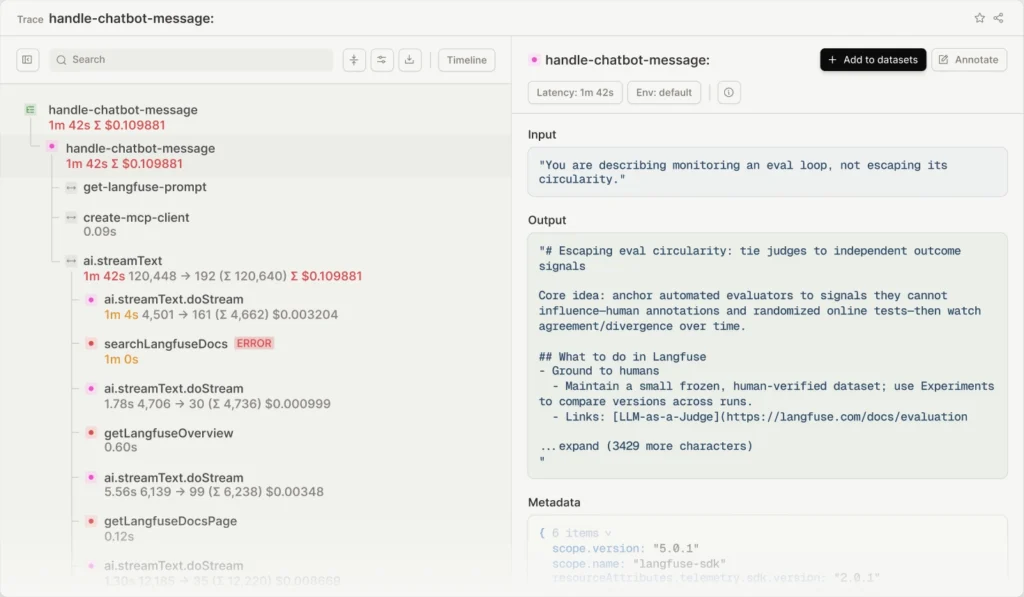
Langfuse is an open-source LLM engineering platform that excels at deep, execution-level tracing. When you chain multiple LLM calls or tools together (like in a complex RAG application or multi-agent setup), Langfuse visually maps out the entire execution path. You can see exactly how long each step took, how many tokens were consumed, and what the exact inputs and outputs were at every single node.
It also has a robust evaluation system, allowing you to use “LLM-as-a-judge” to automatically score the accuracy and tone of your application’s responses in real-time. In general, with Langfuse, you can track model cost, latency, improve prompts iteratively, and inspect where your agentic model makes errors.
LangSmith
Created by the team behind LangChain, LangSmith is the enterprise heavyweight for AI observability. While it works with any framework, it natively integrates with LangChain and LangGraph, making it the absolute best tool if your stack is already built on those libraries.
LangSmith’s biggest strength is its seamless transition from debugging to testing. If you find a bad trace in production, you can instantly extract that specific input, add it to a testing dataset, and tweak your prompts in an interactive playground until you fix the issue – all within the same dashboard.
Confident AI
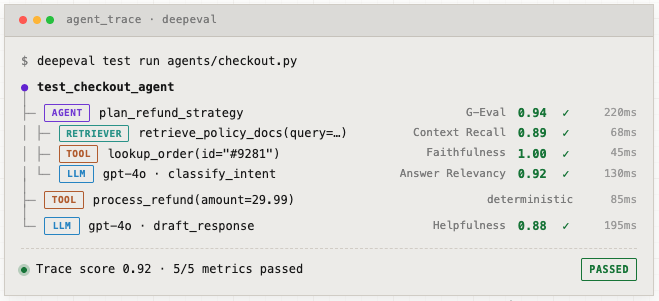
If DeepEval is the open-source testing framework, Confident AI is the hosted platform built on top of it by the same team.
Think of it as the managed cloud layer that turns local eval scripts into something a whole team can use. DeepEval is the open-source framework you run locally or in CI. And Confident AI adds centralised test management, observability, collaboration, and analytics so evaluation workflows scale organisation-wide.
In practice that means the same test file you run on your laptop now also gives you shared dashboards, dataset versioning, regression tracking, production tracing, and prompt versioning in one place. And crucially, it lets product managers and domain experts tweak prompts, run experiments, and evaluate results without an engineering bottleneck.
Weights & Biases (W&B)
If you’ve done any serious model training, you’ve almost certainly already touched Weights & Biases. It’s long been the default for experiment tracking, logging your metrics, hyperparameters, and model versions so you can actually compare runs instead of squinting at terminal logs.
What makes it relevant here is Weave, their LLM observability and evaluation layer. You drop a @weave.op decorator on your functions, and it automatically traces every LLM call, capturing inputs, outputs, token usage, cost, and latency without manual setup. Then it layers an evaluation framework with custom scorers on top.
AI Deployment
You have prepared your dataset, rented the GPUs, and fine-tuned your model. The final and arguably most critical step is deployment: serving that model so users – or other software applications – can actually interact with it. How you deploy depends entirely on who is using the model and where it needs to run.

If you are building with LLMs, the Ximilar VLM Platform actually skips this entire headache. The moment your custom model finishes training on our platform, you can download it and deploy it yourself.
vLLM
If you are building a production backend that needs to serve thousands of concurrent users, vLLM is the gold standard. Born out of UC Berkeley, this open-source inference engine is designed for one thing: raw speed and maximum throughput.
It achieves this using a technique called PagedAttention, which manages the GPU’s memory cache much like an operating system manages RAM, alongside continuous batching. Instead of waiting for one user’s prompt to finish generating before starting the next, vLLM dynamically weaves multiple requests together on the fly.
vLLM can be used as a command-line interface (CLI), or you can write your own Python code with the library. For example, to serve a model like Qwen:
vllm serve Qwen/Qwen2.5-1.5B-InstructAnd then make a simple REST request via curl like this:
curl http://localhost:8000/v1/completions \
    -H "Content-Type: application/json" \
    -d '{
        "model": "Qwen/Qwen2.5-1.5B-Instruct",
        "prompt": "San Francisco is a",
        "max_tokens": 7,
        "temperature": 0
    }'
Ollama
If vLLM is the bullet train for production, Ollama is the sports car for local development.
Often described as the “Docker for LLMs,” Ollama makes running models on your own machine completely frictionless. You don’t need to write Python scripts or configure Docker containers. You simply run a single terminal command, and the model downloads, compiles, and serves itself on a local port.
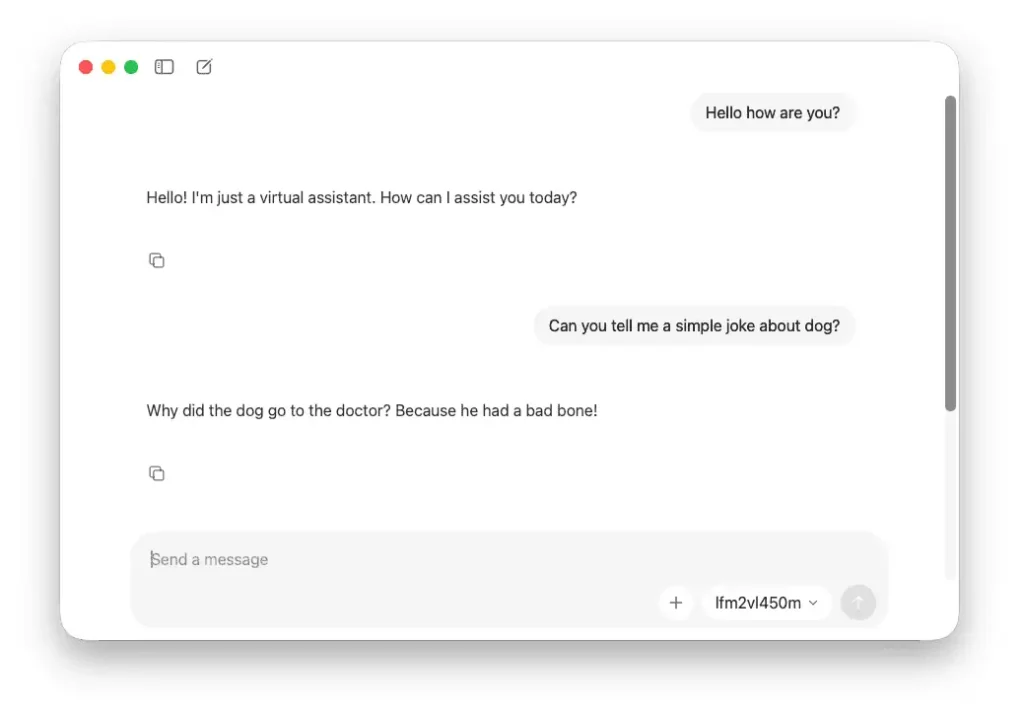
Under the hood, it uses the highly optimised llama.cpp library and GGUF quantisation. This makes it incredibly memory efficient for single-user scenarios. Ollama also offers a simple desktop app where you can chat with a local model much like ChatGPT.
Triton & TensorRT LLM
TensorRT-LLM is the optimisation library and engine. It takes a model and compiles it into an optimised TensorRT engine (the trtllm-build step). Then runs it via its own C++/Python runtime.
When you move beyond just text data LLMs and need to serve a complex, multi-modal enterprise pipeline, Triton is the heavyweight champion. Maintained by NVIDIA, Triton isn’t just for LLMs – it is a general-purpose inference server.
You can use it to host a PyTorch computer vision model, a TensorFlow recommendation engine, and a TensorRT-LLM text model all on the exact same GPU, dynamically balancing the load between them. Triton is a great system for distributed inference. If you have multiple servers and multiple models, this is the system to pick.
Smartphones Deployment
In 2026, we have crossed a critical threshold: you no longer need cloud servers to run capable AI. Deploying models after fine-tuning directly onto smartphones (iOS and Android) or edge IoT devices is becoming the standard for apps that require extreme privacy, zero latency, or offline functionality.
Using aggressively quantised models (like 4-bit Llama 3 or Gemma) combined with mobile-native frameworks like CoreML (Apple) or TensorFlow Lite, developers can now run inference directly on the phone’s Neural Processing Unit (NPU).
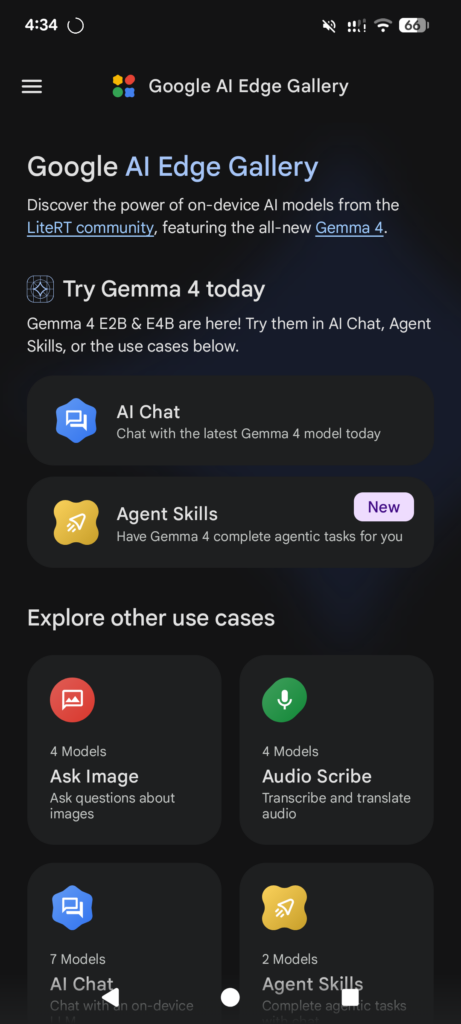
Google AI Edge Gallery or PocketPal AI are apps that allow you to run local small LLMs like Gemma 4 on your Android or iPhone. If you want to integrate this into your own apps, Liquid AI models are worth considering – they are small but perform extremely well on smartphones. For integrating them via Swift (iOS/macOS) or Kotlin (Android), you can read the tutorials from the Liquid AI documentation.
Best Practices for Fine-Tuning LLMs
Before you commit to a platform and launch your first training run, a few best practices for fine-tuning large language models are worth keeping in mind regardless of which tool you choose.
- Start with data quality, not quantity. Fine-tuning is the process of adapting a pre-trained LLM to a specific task using task-specific data. The quality of that training data matters far more than the volume. A few hundred high-quality, well-labeled examples will outperform thousands of noisy ones. Clean, consistent, real-world examples of the inputs and expected outputs you care about are the foundation of model performance.
- Consider Retrieval-Augmented Generation (RAG) before fine-tuning. For many use cases, RAG is faster to implement, cheaper, and easier to update than full fine-tuning. Model fine-tuning shines when you need a specific output style, need to teach the model a specific task it can’t do with prompt engineering, or when latency and inference cost matter enough to justify the training process.
- Use parameter-efficient fine-tuning techniques. Standard fine-tuning updates all model weights, which is expensive. Parameter-efficient fine-tuning (PEFT) methods like LoRA and QLoRA dramatically reduce the time to train and the GPU memory required by only updating a small subset of parameters. For most use cases, the fine-tuned model performance from LoRA is indistinguishable from full fine-tuning.
- Monitor your metrics. Track training loss and validation loss carefully – if validation loss starts increasing while training loss continues to fall, you are overfitting. Use early stopping and regularization to prevent this. Tools like Weights & Biases make tracking these metrics across runs straightforward.
- Version your fine-tuning datasets. Treat your training data like code. Version-control your datasets, keep track of what data went into each model version, and document your hyperparameters (including learning rate and batch size) so that runs are reproducible. This is especially important when training a model from scratch or making iterative improvements.
- After you fine-tune models, evaluate them systematically. Don’t rely solely on loss curves. Build an evaluation set that reflects your real-world use case, and measure task-specific metrics. For text generation, BLEU and ROUGE scores are common baselines. For more complex tasks, consider LLM-as-a-judge approaches or custom scorers.
Conclusion: The Future of Your Custom AI
Fine-tuning LLMs used to require a PhD in distributed systems and a massive compute budget. Today, the landscape looks entirely different. The AI toolchain has matured into a highly modular ecosystem where fine-tuning large language models and other machine learning projects are within reach for individual developers and small teams.
Whether you are using the enterprise-grade managed environment of Alibaba Cloud Model Studio, running a visual training pipeline locally with Unsloth Studio, renting decentralised raw compute on Vast.ai, or deploying your finished model frictionlessly with Ollama, you finally have total control over your model’s intelligence, privacy, and costs. But having access to complex infrastructure doesn’t necessarily mean you want to manage it.
That is exactly why we built the Ximilar VLM Platform. We wanted to create an end-to-end ecosystem where you can bypass the MLOps headaches entirely. On our platform, you can create your dataset from scratch (or optionally upload your text/image-text dataset directly), train a state-of-the-art Vision-Language Model without writing a single line of code, evaluate it, and then download it. We handle the heavy lifting of GPU provisioning and inference optimisation, so you can focus entirely on what actually matters: your data and your product.

Tags & Themes
Related Articles
Instance Segmentation on Click: Build Your Own AI Model
Train your own instance segmentation model with Ximilar’s no-code computer vision platform – from polygon annotation to a deployed API.
How to Train an Object Detection Model With One Click
Define, optimize and deploy to API your custom object detection model without coding.

Hololive Card Recognition for Card Scanners & Collector Apps
Ximilar’s AI now identifies every hololive OFFICIAL CARD GAME (hOCG) card – name, set, rarity, and more – in English and Japanese.